









Overview
About Metal Slug X - Super Vehicle-001 (NGM-2500)(NGH-2500)
What the record confirms
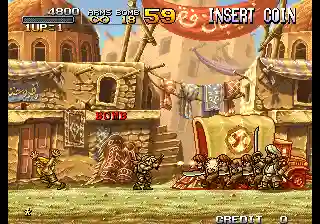
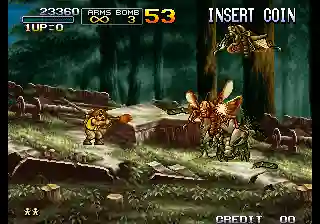
The source title is Metal Slug X - Super Vehicle-001 (NGM-2500)(NGH-2500). The entry is filed under Classic Arcade, with Classic Arcade recorded as its platform value. The supplied release field is 1999. Recorded tags include Metal Slug, Run and Gun, Co-op, Neo Geo, Classic Arcade, Shooter, Action, Arcade, Fast Paced, and Boss Battles.
The catalog explains that this page is intended to make the specific entry available for browser play while keeping the supplied metadata visible. No additional story, credit, rating, or performance evidence is included in the record.
Platform and version identification
The category and platform fields both say Classic Arcade. The title includes two identifiers, NGM-2500 and NGH-2500, and the tags include Neo Geo. These identifiers are preserved exactly as supplied. The record does not state whether they represent separate revisions, regional variants, or a particular cartridge and board configuration.
| Catalog field | Recorded value |
|---|---|
| Source title | Metal Slug X - Super Vehicle-001 (NGM-2500)(NGH-2500) |
| Category | Classic Arcade |
| Platform field | Classic Arcade |
| Related platform tag | Neo Geo |
| Release field | 1999 |
| Title markers | NGM-2500 and NGH-2500 |
Supported genre signals
The recorded metadata supports run and gun, shooter, action, and arcade as genre or style labels. Co-op, fast paced, and boss battles are also explicit tags. These terms describe how the catalog classifies the entry; they do not supply a stage guide, move list, difficulty report, or independently checked feature list.
The Metal Slug and Neo Geo tags establish the catalog's naming and platform associations. The record gives no plot synopsis, character roster, enemy list, soundtrack information, or development credits.
How to play online
Guidance: Open the entry in a current browser and use the page's browser-play control when it appears. Allow the game area to complete its initial load, then click or tap inside it before testing input. If an emulator panel shows a start command, use that command once and wait for a visible response.
The evidence confirms the page's intended browser-play purpose, but it does not specify the emulator, BIOS requirements, loading time, save support, network co-op, audio behavior, or controller layout. Those details should be treated as unknown until the interface reports them.
Controls and device troubleshooting
Guidance: For keyboard play, click the game surface so it owns focus and test directional input before trying action buttons. For a USB or Bluetooth controller, verify that the browser sees the device and that the emulator maps the required buttons. On touch devices, use the on-screen controls if present and keep the device orientation that leaves the controls readable.
- Refresh once if the game surface is still blank after the normal load period.
- Disable an interfering extension or close heavy tabs when input feels delayed.
- Try a second current browser if the controller or keyboard is not recognized.
- Use any status message on the entry to distinguish loading from a failed start.
What is unknown
The record does not state the developer, publisher, exact Neo Geo release relationship, emulator core, save-state behavior, multiplayer implementation, video scaling, audio quality, accessibility support, or rating. The 1999 value is a supplied release field, not a wider claim about every regional or hardware release.
Editorial method and limitations
This editorial entry uses only the source title, category, platform field, tags, release field, title markers, and supplied descriptions. It distinguishes catalog facts from general browser guidance and does not claim personal playtesting or emulator verification. Missing credits and technical fields are left unidentified rather than filled from outside assumptions.
The NGM-2500 and NGH-2500 strings are retained because they are part of the source title. Their exact meaning is not expanded beyond what the record itself confirms.
Practical next step
Open the Classic Arcade entry, start the browser-play interface, and note whether the page identifies a keyboard, controller, or touch layout. If the game does not start, capture the browser and device details along with the visible message so troubleshooting can remain tied to this specific 1999-marked catalog record.