
















Overview
About Pang (World)
What the catalog confirms
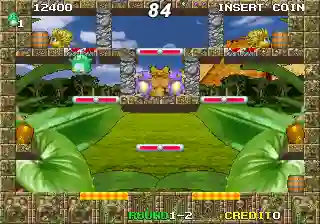
The supplied Retro Games record names Pang (World) and places it in the Classic Arcade category. The release field is 1989. The source description says this specific catalog entry is intended for browser play while retaining its supplied metadata.
| Field | Recorded value |
|---|---|
| Title | Pang (World) |
| Category | Classic Arcade |
| Platform field | Classic Arcade |
| Release field | 1989 |
| Title marker | World |
Platform and version identification
The platform field is Classic Arcade. The title carries the marker World, and the tags include World Release. Together, those fields identify how this catalog record labels the version, but they do not document a specific territory list, cabinet board, revision number, publisher, or developer.
Genre signals from metadata
Recorded tags include Co-op, Arcade, Classic Arcade, World Release, Coin-Op, Classic, Retro, Browser Play, Quick Play, and Old School. These support an arcade and coin-op classification with a co-op signal and a short-session orientation in the catalog language. The tags do not provide a complete rules explanation or confirm how any mode operates.
How to play online
Guidance: Open the Pang (World) entry in a current browser and allow the player area to load. Click inside the player before pressing keys, because browser focus determines where keyboard input goes. The record indicates intended browser availability, but it does not verify frame rate, latency, audio, save states, or the exact emulator used.
Guidance: If a start or fullscreen control is shown, use it after the player is visible. For a co-op-tagged entry, treat the tag as catalog metadata and confirm actual player support in the interface before planning a session. Do not assume that a second controller or online multiplayer is available.
Controls and device troubleshooting
Guidance: Begin with a physical keyboard on desktop. Re-click the game area if keys stop responding, close menus that may have focus, and return browser zoom to its default setting. On a phone or tablet, use on-screen controls only if the player provides them; the supplied record does not confirm touch support.
Guidance: If loading stalls, refresh once, check the network, and try another current browser. For missing audio, inspect the tab mute icon and system volume. If two inputs are expected, test them one at a time and note what the player actually accepts. These are practical browser steps, not verified facts about Pang (World).
What is unknown
No plot, character list, developer, publisher, rating, cabinet specification, control map, regional comparison, or technical emulator documentation is supplied. The record does not confirm whether co-op is simultaneous, alternating, local, or merely a descriptive tag. It also does not establish a save system, continue rules, or display options.
Editorial method and limitations
The editorial account uses only the supplied title, World marker, category, platform field, tags, release field, and source descriptions. Statements about genre are limited to those metadata labels. Browser instructions are explicitly guidance based on common web-player use. There is no claim of personal playtesting, external research, or emulator verification.
Practical next step
Check the visible title and World identity, launch the browser player, and test one input before changing settings. If you are evaluating the co-op label, verify whether the interface exposes a second control scheme and document that observed behavior separately from the stored 1989 and World Release metadata.