










Overview
About Pac-Man (Midway)
What the record confirms
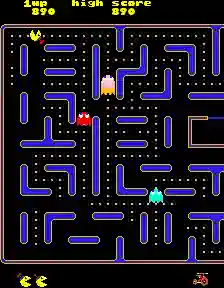
The catalog identifies this entry as Pac-Man (Midway). Its category and platform fields both read Classic Arcade, and the title carries the Midway marker. The supplied facts describe the page as a browser-play catalog entry that keeps the recorded metadata visible. No release date is supplied for this specific record.
The name and tags establish the database identity, but they do not establish a complete historical credit line or a particular machine revision. No developer, publisher, rating, regional release list, or technical dump information is included in the evidence provided.
Platform and version identification
The platform value is Classic Arcade, matching the category. The title marker is Midway. The release field is blank, so this record should not be assigned a year from outside assumptions. The available facts identify the catalog label rather than a board revision, cabinet type, or emulation package.
| Stored field | Recorded value |
|---|---|
| Title | Pac-Man (Midway) |
| Platform | Classic Arcade |
| Category | Classic Arcade |
| Title marker | Midway |
| Release field | Not provided |
Genre signals in the metadata
The record supports maze, arcade, coin-op, puzzle, strategy, logic, high-score, and brain-teaser descriptions through its tags. Pac-Man is also a supplied tag. These labels are appropriate for describing the catalog classification, but they do not provide a stage list, enemy behavior, scoring table, plot, or difficulty curve.
The combination of maze, puzzle, strategy, and high-score tags suggests a record organized around repeatable arcade challenges and score-oriented play as metadata categories. That interpretation remains limited to the supplied tags and is not a report of personal play or measured game behavior.
How to play online
Guidance: Open the entry in a current browser and activate the player using the control shown on the page. Wait for the game area to finish loading before pressing keys. If the player offers fullscreen or a start control, use those visible controls after the page is ready. The record confirms browser-play intent, but it does not identify the emulator, browser requirements, loading time, save support, or input latency.
For a clean session, keep the page focused and avoid refreshing while a run is active. General browser guidance can improve setup, but it cannot confirm that every device renders or responds in the same way.
Controls and device troubleshooting
Guidance: Read the player’s displayed key map before play. On a desktop, click inside the game area so keyboard focus is captured, then test movement and the mapped action keys. On a mobile device, use any touch controls the player supplies and keep the browser in the orientation that best fits the game area.
If the game does not react, click the play area again, close other tabs that may capture keys, and retry in a current or private browser window. A controller may help when browser gamepad support is exposed, but controller support and the original arcade controls are not documented in this record.
What is unknown
The evidence does not provide a release year, developer, publisher, arcade board revision, cabinet details, ROM source, emulator name, control mapping, audio or video specifications, save behavior, accessibility settings, or multiplayer information. It also does not explain the relationship between the Midway marker and any other edition.
No rating, review result, playtime estimate, story description, or verified performance claim is available. Those details should remain unknown rather than being inferred from the familiar game name or from the Classic Arcade category.
Editorial method and limitations
This page distinguishes catalog evidence from practical browser guidance. The evidence consists of the title, Classic Arcade category and platform, Midway title marker, and the supplied tag set. Genre language follows those tags. Because the release field is empty, the editorial text explicitly leaves the year unprovided.
The entry does not claim personal playtesting, emulator validation, or independent historical research. It presents what the database confirms and marks missing fields so readers can judge the scope of the record accurately.
Practical next step
Verify that the page identifies Pac-Man (Midway) and Classic Arcade before launching the player. Review the visible control map, focus the game area, and begin with a short test so keyboard or touch input can be checked. If loading or controls fail, note the browser, device, and exact visible symptom for follow-up.